Prompt Composer
Prompt Composer is a rich-text composer that floats over any terminal. Press Ctrl⇧P on a focused terminal, or toggle the composer button in its toolbar, to open it. While the mode is on, the composer follows your focus from terminal to terminal.
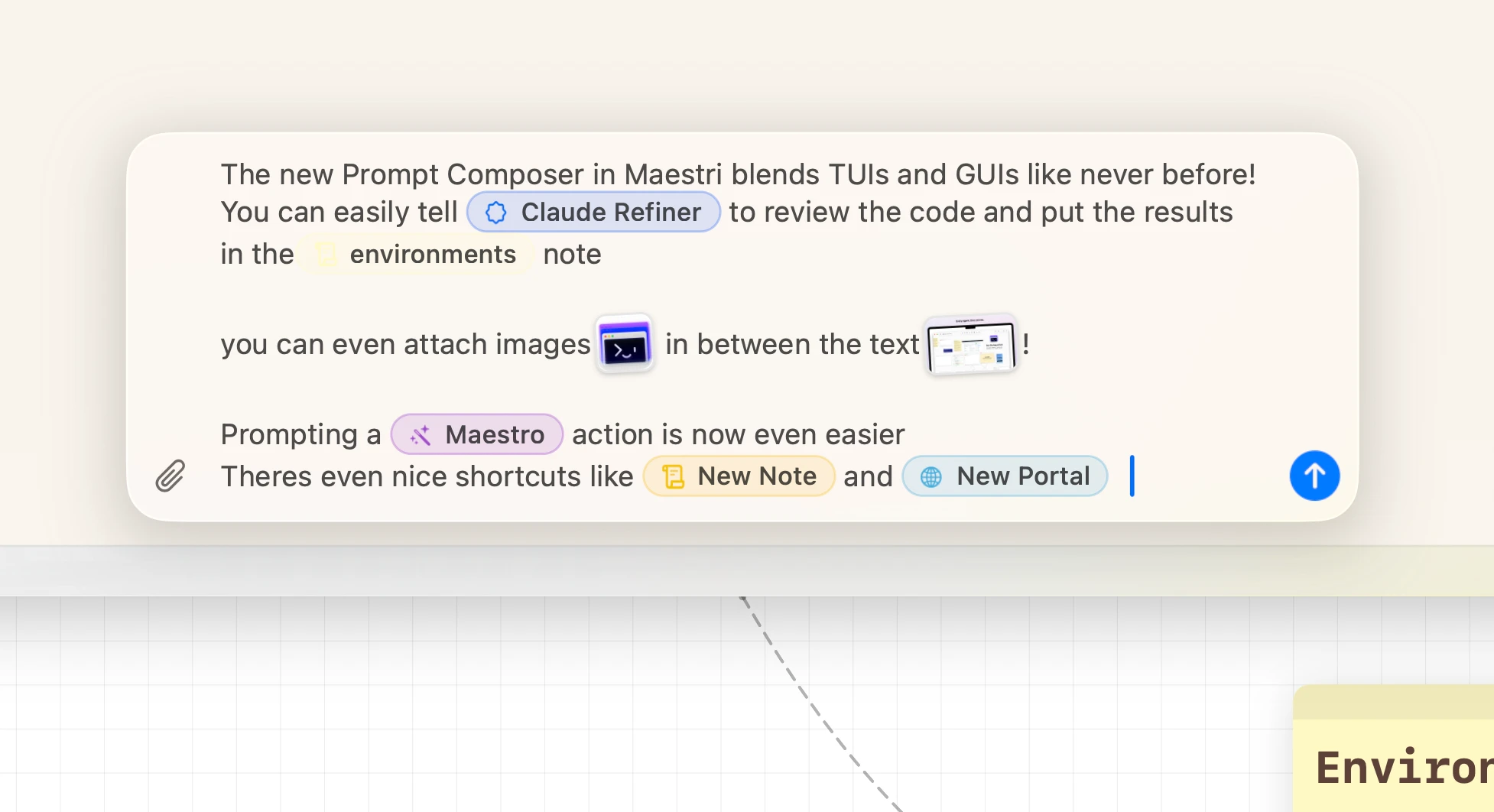
Mentions
Type @ to reference anything connected to the terminal:
- Terminals — address a connected agent by name.
- Notes — point the agent at a sticky note. It reads the live note, not a stale snapshot.
- Portals — point the agent at a browser or device portal it can drive.
- File… — search your project and attach a file to the prompt.
- @Maestro — on Maestro-enabled terminals, an explicit "orchestrate this". The manager recruits and coordinates visible agents on your canvas.
- Actions — @New Note, @New Portal, and @New Device Portal ask the agent to create things on the canvas.
Agents wired to you from another workspace appear in the same menu, addressed as Name @ Workspace. See Across workspaces.
Type # where a mention could start and the file picker opens straight away, skipping the menu's File… row. It browses the terminal's own working directory, including a directory on a remote machine when the terminal runs over SSH or in a container, and inserts the path relative to it. Anywhere else, # is just a character, so "issue #42" types the way you'd expect.
Images and files
Paste a screenshot, drop a file, or click the paperclip:
- Images appear inline as tilted previews. On CLIs that support it (Claude Code, Codex, Gemini), images arrive natively as pixels, exactly where you placed them.
- Other files become chips with their Finder icon and deliver as a path.
- On SSH terminals, image bytes stream to the remote host so the path resolves where the agent runs.
Large pastes
Paste something big — more than 800 characters, or more than two lines — and it folds into a pill instead of flooding the composer, the way Claude Code and Codex fold a big paste. The pill says what it holds: Pasted text #2 · 42 lines.
The text itself rides inside the pill, not a reference to it, so it sends exactly as you pasted it, where the pill sat. Click the pill (or press Return with it selected) to unfold it back into editable text. Each paste keeps its number through cut, paste, and undo, so #2 stays #2 even when you move it ahead of #1.
Drafts
Each terminal keeps its own draft. Escape, switch floors or workspaces, and your text and pills are waiting when you come back. Only sending clears it.
With the composer empty, arrows, Return, and Tab pass through to the terminal so you can answer approval dialogs without dismissing it.
Keyboard reference
- ⌘⇧P — Toggle Prompt Composer
- @ — Mention terminals, notes, portals, Maestro
- # — Open the file picker directly
- Return — Send
- ⇧Return — New line
- / — Jump to CLI slash commands (empty composer)