Fichários
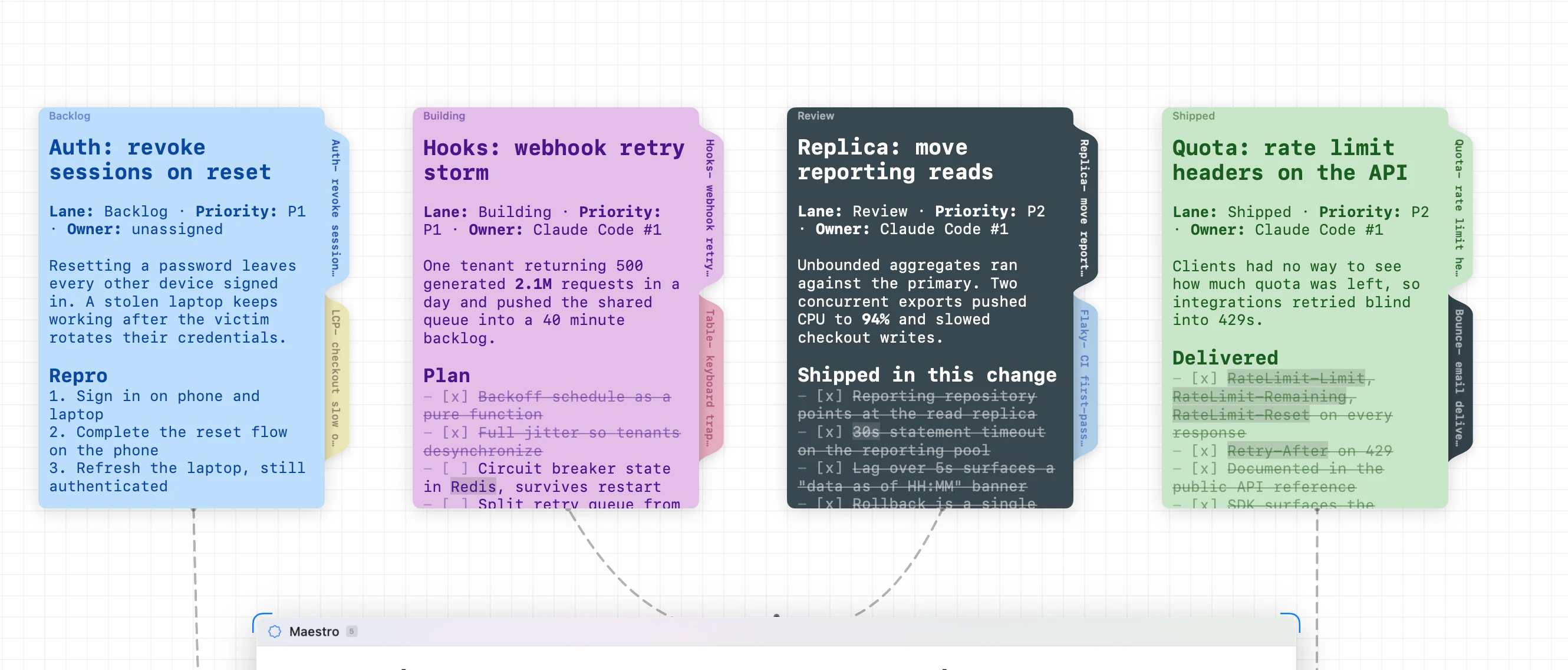
A Fichário gathers loose notes into one tabbed folder. The notes stay real notes — they just live as pages inside it, reachable from the tabs down the right side, so a corner of the canvas that had grown into a pile of stickies becomes a single node you can flip through.
Creating one
Select two or more notes, right-click, and choose Place in Fichário.
Adding and removing pages
- Add a note — drop it inside the Fichário.
- Take one out — click and drag from its tab on the right, and that page becomes a free note again.
- Flip — click a tab to bring that page to the front. Hover one to see a preview of the page it holds, without flipping to it.
- Reorder — drag a tab up or down.
Notes filed into an existing Fichário land at the top, newest first, the way paper lands on a pile. A note belongs to one Fichário at a time.
Connect one to an agent
Connect a Fichário to an agent and it can access every page inside.
Locking a page
Right-click a tab and choose Lock Contents to freeze that one page. The tab wears a small lock, the page turns read-only, and connected agents can read it but not write to it, exactly as with a free note. Every other page in the folder stays editable.
One color for the whole folder
New pages an agent adds get a random color, which is useful when you're skimming a busy canvas and less useful when the folder should read as one object. Right-click the Fichário and choose Uniform Color to paint every page the same.
Name it to keep it
Right-click a Fichário and Rename it. A named Fichário stays on the canvas even when it holds no notes at all, while an unnamed one dissolves once its pages are gone.
That's what makes task-based workflows work. Name a few Fichários for the stages you care about — Backlog, Building, Review, Shipped — and they hold their place as empty folders waiting for work, instead of vanishing every time a lane clears.